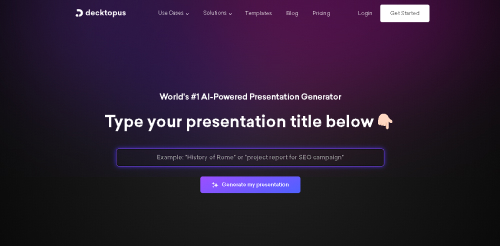
Decktopus is an AI presentation maker that can turn a topic, prompt, or uploaded file into a structured slide deck. It generates an outline, slide copy, and design, then lets users revise the result with natural-language instructions instead of rebuilding every slide manually.
This Decktopus review covers its current Studio workflow, Brand Kit, rehearsal feedback, export options, privacy position, and official pricing. It is best viewed as a fast first-draft system for presentations—not a replacement for fact-checking, storytelling judgment, or a final design review.
What is Decktopus?
Decktopus is a browser-based presentation platform built around AI-assisted creation. A user can describe the intended presentation or upload source material, choose an audience and purpose, and let the system propose a deck. The current Studio product also supports carousels, making it useful for repurposing a core idea into a more social-friendly format.
The main benefit is speed. Decktopus handles the blank-page work—initial structure, wording, visuals, and layout—so the user can spend more time checking evidence, sharpening the argument, and preparing the delivery.
Decktopus features
AI presentation generation
Start with a topic or upload a document. Decktopus generates a complete structure with slide content and design. This can be useful for sales proposals, training material, class presentations, reports, webinars, and internal briefings when a presentable first draft is needed quickly.
Natural-language editing
Users can request changes in ordinary language instead of adjusting every element individually. For example, a deck can be shortened, the tone can be changed, or a section can be rewritten for a different audience. The result should still be reviewed slide by slide because AI editing can remove context or introduce unsupported wording.
Brand Kit from a website URL
Decktopus can use a website URL to help create a Brand Kit. This gives teams a faster way to bring recurring colors, type, and visual identity into new decks. Business users who produce client-facing material regularly will get more value from this than occasional presenters.
Loop rehearsal feedback
Loop is Decktopus’s rehearsal feature. It is intended to give feedback while a user practices a presentation. That makes Decktopus more than a slide generator: it also supports preparation for the actual delivery, where timing, clarity, and confidence matter as much as the visuals.
Export and sharing
The official product pages list PDF, PowerPoint, and PNG export options. Export availability is important for teams that must present offline, hand a deck to a client, or continue editing in another tool. Always check exported slides for font substitution, cropping, animation loss, and layout shifts before presenting.
How to create a presentation with Decktopus
- Define the audience, goal, and single action the presentation should drive.
- Open Studio and enter a focused topic or upload reliable source material.
- Review the proposed outline before spending credits on unnecessary slides.
- Generate the deck, then verify every statistic, quotation, and product claim.
- Use natural-language edits to tighten the story and remove repetitive slides.
- Apply the correct Brand Kit and replace generic visuals where needed.
- Export a test copy and inspect it on the device or software used for delivery.
- Practice with Loop and make final edits based on pacing and audience comprehension.
Decktopus pricing
Decktopus lists different billing periods for Pro. The prices below were checked against the official Decktopus pricing page in August 2026 and may change.
| Plan or term | Listed price | Included AI credits |
|---|---|---|
| Pro annual | $9.99/month, billed $119.88 yearly | 750/month |
| Pro three-month | $19.99/month, billed $59.97 | 750/month |
| Pro monthly | $24.99/month | 750/month |
| Business | Check current team pricing | 1,000 per seat/month |
Decktopus estimates that 750 credits can produce about 150 slides, but actual consumption depends on the actions used. Business is aimed at teams and adds a shared workspace, Brand Kit controls, slide analytics, custom domain options, and priority support. Compare the complete terms before choosing a longer billing commitment.
Data privacy and AI training
Decktopus states that customer data is excluded from AI training by default. That is a useful baseline, but businesses should still review the current privacy policy, data-processing terms, and access controls before uploading confidential financial, customer, health, or legal documents.
An AI presentation service processes both the prompt and any uploaded source. Use approved content, remove unnecessary personal data, and avoid uploading material that your organization is not authorized to send to a third-party platform.
Decktopus pros and cons
| Pros | Cons |
|---|---|
| Fast structure, content, and design generation | AI-generated facts and wording require verification |
| Natural-language editing reduces manual work | Complex custom design may still need another editor |
| Brand Kit helps recurring business use | Credit use can matter for high-volume teams |
| Multiple export formats and rehearsal support | Exports should be checked for layout changes |
Who is Decktopus best for?
- Founders and sales teams that need a persuasive first draft quickly.
- Teachers and trainers who regularly turn structured material into lessons.
- Marketers creating presentations and carousels from the same campaign idea.
- Small teams that value shared branding and repeatable production.
- Students who understand that generated content still needs citations and original analysis.
It is less suitable when a presentation depends on complex animation, strict enterprise templates, or highly specialized data visualization that must be built manually.
Decktopus review verdict
Decktopus is a practical AI presentation maker for reducing first-draft time. Its strongest combination is generation plus editing, branding, export, and rehearsal. The platform can help a team produce more consistently, but the final quality still depends on source accuracy, a clear narrative, and human review.
Try Decktopus through our creator link. Verify current credits, renewal price, and plan limits on the checkout page before subscribing.
Affiliate disclosure: AI Tools Arena may earn a commission from purchases made through this link, at no extra cost to you.
Frequently asked questions
Can Decktopus export to PowerPoint?
Yes. Decktopus lists PowerPoint export along with PDF and PNG. Check the exported file carefully because fonts and layout can render differently outside the browser.
What are Decktopus AI credits?
Credits are the usage allowance for AI actions. Pro currently lists 750 credits per month, estimated at roughly 150 slides, while Business lists 1,000 credits per seat.
Does Decktopus use customer data to train AI?
The company says data is excluded from AI training by default. Organizations should still review the latest contractual and privacy documentation for their own compliance needs.
