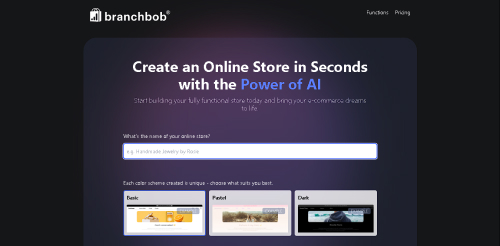
Branchbob Tutorial: Build and Launch an Online Store

Branchbob is a hosted e-commerce platform for creating and managing an online store without coding. It supports physical and digital products, customizable storefronts, inventory and customer management, invoices, multiple currencies and languages, and online or offline payment methods.

Branchbob tutorial for building an online store
Branchbob provides a hosted storefront, catalog, payments, inventory, customer records, and invoicing.

Affiliate disclosure: this article preserves the original Branchbob creator URL. AI Tools Arena may receive a referral benefit if you use it, at no additional cost to you.

Branchbob’s Current Store Features

The official feature page lists customizable design, product and inventory management, customer records, automatic invoices, extra pages, multi-language and multi-currency support, and several payment options. Plan limits and checkout requirements can change, so review the current pricing and FAQ before committing.

Branchbob says a store can be created with basic functions at no cost, while its current FAQ notes that enabling checkout requires a subscription once the store is ready. Treat “free store builder” and “free to sell indefinitely” as different claims.

Before You Create the Store

Prepare a product list, prices, tax treatment, inventory, shipping regions, return rules, legal business details, product media, and the bank or payment accounts you are authorized to connect. Choose one primary currency and market for the first launch.

Branchbob Tutorial

1. Create the Store and Confirm Ownership

Register with an address controlled by the business, use multi-factor authentication when available, and record who owns the domain, store account, payment accounts, and recovery details.

2. Configure Business Details

Add the legal name, support contact, address where required, currency, language, tax settings, invoice details, and notification email. Have a qualified adviser review tax and legal configuration for your jurisdiction.

3. Add a Test Product

Start with one representative product. Write a unique title and description, add rights-cleared images, set price and tax, enter stock or availability, define variations, and record weight or dimensions if shipping depends on them.

4. Organize the Catalog

Create categories based on how customers shop, not internal jargon. Keep navigation shallow, use consistent product attributes, and prevent empty or duplicate category pages from multiplying.

5. Customize the Storefront

Apply the logo, fonts, colors, homepage sections, and contact details. Check contrast, readable mobile text, button labels, image cropping, and the path from landing page to product to cart.

6. Configure Payments

Branchbob currently lists options such as PayPal, Amazon Pay, cards through supported providers, invoice, prepayment, cash on delivery, and pickup. Availability varies by country and provider. Verify fees, settlement currency, refunds, identity checks, and test mode.

7. Set Shipping and Fulfillment

Define eligible regions, methods, rates, free-shipping thresholds, pickup rules, handling time, tracking, and excluded products. Test edge cases such as remote addresses, mixed carts, heavy items, and out-of-stock variants.

8. Publish Required Pages

Add privacy, terms, shipping, returns, cancellation, legal notice, and contact pages appropriate to your market. Do not copy another store’s legal text without review.

9. Test Checkout End to End

Use test mode where supported or place a controlled low-value order. Confirm tax, shipping, payment, inventory reduction, invoice, customer and admin email, cancellation, refund, and mobile usability.

10. Connect the Final Domain and Launch

Check DNS, HTTPS, canonical URLs, titles, descriptions, product schema behavior, analytics consent, sitemap access, and search indexing. Keep a rollback plan and support contact available during launch.

Launch Checklist

  • Accurate product, inventory, price, and tax data
  • Verified payment settlement and refund process
  • Tested shipping rates and restricted regions
  • Working emails, invoices, and contact forms
  • Mobile cart and checkout tested
  • Required privacy and commerce policies published
  • Domain and analytics owned by the business
  • Current subscription and checkout requirements understood

If you need a simpler service website rather than a product store, compare the Pineapple Builder tutorial.

Frequently Asked Questions

Is Branchbob free?

Current official pages describe free creation and basic functions, while the FAQ says checkout requires a subscription. Verify current plan limits before launch.

Can Branchbob handle digital products?

Digital products are listed in current plan information. Confirm delivery, file limits, tax, and payment requirements for your market.

Does it charge transaction fees?

Do not assume zero total fees. Review Branchbob’s current terms plus payment-provider, currency, tax, and other third-party costs.

Final Takeaway

Branchbob can provide a straightforward path to a hosted store, but launch quality depends on accurate catalog data, correct payments and shipping, compliant policies, and complete checkout testing. Build one representative product first, then scale the catalog after the workflow passes QA.

Scroll to Top